Page 1 of 2
photoshop question - NLC
Posted: Tue Oct 12, 2010 4:16 pm
by ClarkyBoy
so as i know that there are plenty of camera/photgraphy/retouching experts here,
how do i make a B+W picture like the below only selecting some colours to stand out?
ross, i think i have seen some on your flickr like this before?
 Lotus Exige S260
 by
a7xbass94, on Flickr
Re: photoshop question - NLC
Posted: Tue Oct 12, 2010 4:50 pm
by philthy
Take your time outlining the car and everything you want to with the polygon lassoo tool (top left on the tools),
then go to 'Select' drop down menu and click Inverse,
then go to 'Image' drop down menu and hit Desaturate.
Job done!
Re: photoshop question - NLC
Posted: Tue Oct 12, 2010 4:57 pm
by jen
I do it by adding a layer via copy, desaturating that one, then erasing the stuff you want in colour. I find it easier to fix (by step back) if I go over the bit that I still want black and white.......
Jen
Re: photoshop question - NLC
Posted: Tue Oct 12, 2010 6:47 pm
by s29ttc
My mate has a cool wee app on the iPhone and has done this for me, with decent results


Re: photoshop question - NLC
Posted: Tue Oct 12, 2010 8:43 pm
by Corranga
jen wrote:I do it by adding a layer via copy, desaturating that one, then erasing the stuff you want in colour. I find it easier to fix (by step back) if I go over the bit that I still want black and white.......
Jen
That's the way i've done it in the past too, it can be really effective. Never done it with a car mind, but then I don't take many photos of my cars. I might try it with the car in b&w to stop the car standing out

Chris
Re: photoshop question - NLC
Posted: Tue Oct 12, 2010 9:35 pm
by DDtB
I do it by desaturating the whole pic and then painting the colours back into to certain parts using the history brush .... Very quick and easy...
Re: photoshop question - NLC
Posted: Tue Oct 12, 2010 9:49 pm
by mainsy
DDtB wrote:I do it by desaturating the whole pic and then painting the colours back into to certain parts using the history brush .... Very quick and easy...
Thats the way I do it
Re: photoshop question - NLC
Posted: Fri Oct 15, 2010 9:29 am
by ClarkyBoy
thanks for all you help - i will sit down this weekend and have a go if i get time!!
and that App is brilliant!! do you know what its called? wouldnt mind it myself.
Re: photoshop question - NLC
Posted: Fri Oct 15, 2010 9:35 am
by jen
It's called colour splash. When I first got it I loved it but when I viewed the pics on a computer they were very grainy. I contacted the developer about it and he said he has sorted it but I haven't tried it since......
Jen
Re: photoshop question - NLC
Posted: Fri Oct 15, 2010 9:58 am
by ClarkyBoy
i will get it when i have a moment and let you know how it is now!
Re: photoshop question - NLC
Posted: Fri Oct 15, 2010 8:05 pm
by smee
Desaturation isn't always the best way to convert to blaack and white as you can get a mid grey bias to the image. I would do the same as Jen except chose to convert to black in white and select an appropriate tonal profile, usually scenic landscape but it depends on the colours involved in the background. You can then make adjustments on the sliders for fine tuning. To paint back the colour either select the black and white overlayed car with lasso, magic wand or selection brush and refine edge to 1pixel then paint in with eraser set to 100%. Filter, correct camera distortion and then darken vignette set to about 25% can help draw to the coloured section as well for B&W
Re: photoshop question - NLC
Posted: Fri Oct 15, 2010 9:36 pm
by cloggie
Thanks for this, i always wanted to learn how to do this quickly!!
Here's my 1st attempt from yesterday

Re: photoshop question - NLC
Posted: Fri Oct 15, 2010 10:03 pm
by Stewart
cloggie wrote:Thanks for this, i always wanted to learn how to do this quickly!!
Here's my 1st attempt from yesterday
Nice but I would have rather have seen his(?) eyes in colour also. In fact may work if that was the only thing in colour

P.S.
Apologies if I have the gender wrong

I am crap at baby stuff!
Re: photoshop question - NLC
Posted: Fri Oct 15, 2010 10:38 pm
by jen
That looks great!
I agree with Stewart, try adding colour to the eyes too.
I used coloursplash to do these:
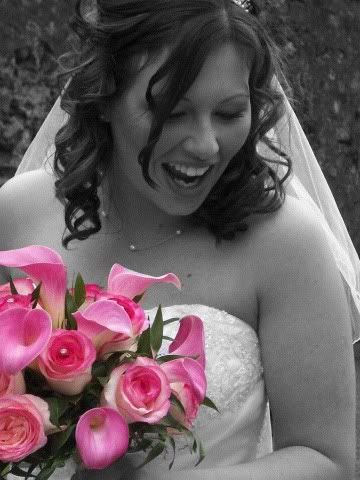
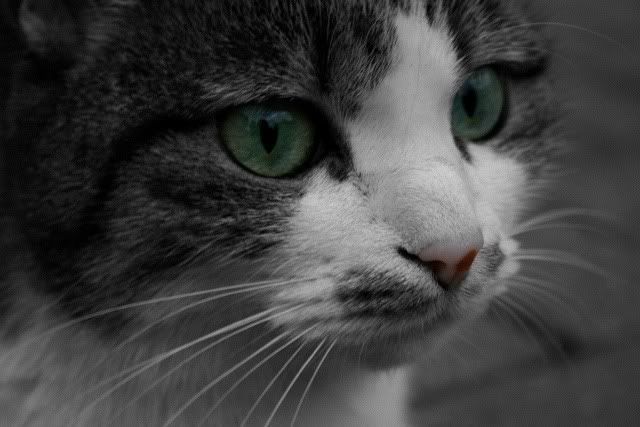
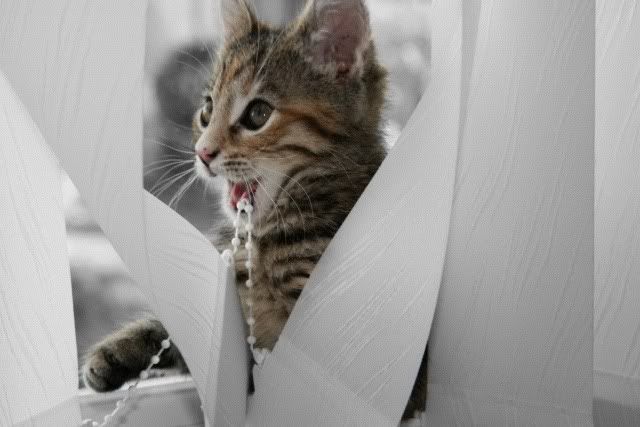
But I didn't like the fact that the pic had been scaled down so learnt how to do it on Photoshop on the computer. I think it produces fantastic results, especially when bright colours are used.
Jen
Re: photoshop question - NLC
Posted: Sat Oct 16, 2010 8:38 am
by Rag_It
Fantastic advice and great to see so many varied ways of carrying it out. I have never really had the time or desire to get to grips with Photoshop or the like and just use iPhotos limited editing tools. Will be sure to try a couple of these techniques out!
Remember this post for camera/photo related questions
http://www.scottishelises.com/phpbb/vie ... =9&t=22229
Jen, really like the last shot of the kitten!
Dave